

SnapOn Software provides software solutions that extend and connect the platforms businesses already rely on, including Microsoft 365, NetSuite, and Salesforce.
We help organizations solve the operational challenges that come with managing data, workflows, collaboration, governance, and business processes across complex technology ecosystems. Our solutions add capabilities that native platforms often don’t provide out of the box, helping businesses automate manual work, improve visibility and control, connect systems, and manage data more effectively.
Our objective is to help businesses build the foundation to adopt and scale AI with greater confidence. SnapOn solutions make data more accessible, connected, governed, and actionable—enabling organizations to take advantage of AI as their technology ecosystem evolves.
SnapOn Software helps organizations get more value from their existing technology investments while building a more connected, efficient, and AI-scalable business.
SnapOn Software Forms is a no-code form builder for SharePoint and Microsoft Teams that turns standard SharePoint forms into intelligent, dynamic business applications.
Built natively within Microsoft 365, Forms helps organizations digitize and automate business processes without custom development, data migration, or moving information outside their Microsoft 365 tenant. Teams can build and adapt forms with conditional logic, dynamic fields, permissions, cascading lookups, repeating sections, validation, automated actions, and connected data, all while maintaining the security, governance, and compliance controls of their existing SharePoint environment.
From employee onboarding and IT requests to purchase approvals, inspections, compliance processes, and customer or vendor intake, Forms helps organisations replace manual processes and disconnected tools with streamlined, automated workflows.
With responsive experiences across SharePoint, mobile, and Microsoft Teams, SnapOn Forms makes it easier to capture, manage, and act on business information wherever work happens, while creating a more structured and accessible data foundation for AI adoption and scalability.
SnapOn Software Data View Plus brings scattered Microsoft 365 data together into centralised, interactive views that make information easier to find, understand, and act on.
Built for SharePoint and Microsoft Teams, Data View Plus aggregates information from across SharePoint sites and lists, Excel, Exchange Online, Microsoft Teams, and other Microsoft 365 sources. Instead of requiring users to search across multiple sites, lists, libraries, and applications, organisations can create a single, connected view of the information that matters.
With no-code configuration, teams can build responsive data experiences using calendars, lists, organisational charts, galleries, aggregated views, conditional formatting, connected filters, and master-detail relationships. Data can be filtered and organised across sites, site collections, content types, and other criteria to surface the right information for each team or business process.
Data View Plus helps organisations turn fragmented Microsoft 365 information into connected, accessible, and actionable data experiences—while reducing reliance on custom development and creating a more structured data foundation for automation and AI scalability.
With Datasheet View, get around the non-intuitive, lackluster SharePoint Quick Edit. Datasheet View adds a new bulk edit screen to your SharePoint lists. This new feature allows you to bulk edit your SharePoint lists in an “Excel-like” interface.
This add-on supports both classic and modern SharePoint lists as well as IE, Edge, and Chrome browsers.
Features:
True “Excel-like” Datasheet view (same as SP2010)
Support both classic and modern lists
Support IE, Edge and Chrome browsers
SnapOn Software CMS365 is a SharePoint-native content management system that helps organizations create, organize, publish, and manage structured knowledge across Microsoft 365.
Organizations often have critical information scattered across SharePoint sites, Teams, files, and outdated wikis, making it difficult for employees to create, find, maintain, and trust the information they need. CMS365 provides a centralized content experience for knowledge bases, policies and procedures, technical documentation, training materials, project documentation, and customer-facing manuals—without moving content outside the Microsoft ecosystem.
Built 100% within SharePoint and integrated with Microsoft Teams, CMS365 adds an intuitive content-management experience with customizable layouts, Markdown editing, advanced search, drafts and approvals, version control, and author tracking. This enables organizations to establish more consistent, accountable, and searchable documentation without building a custom content platform.
Structured knowledge is also a critical foundation for scaling AI. AI tools and agents rely on access to relevant, reliable, and well-managed organizational information. By helping organizations centralize, structure, maintain, and govern their content within Microsoft 365, CMS365 helps create a stronger information foundation for AI-powered search, knowledge retrieval, automation, and agents.
SharePoint for your content. Teams for collaboration. CMS365 for the experience.
Scan & Print transforms how organizations handle physical documents within the Microsoft 365 ecosystem. With seamless integration into SharePoint Online, users can scan, OCR, and upload documents without any third-party data transfer. The solution supports bulk scanning, metadata extraction via Zonal OCR, and secure client-side PDF generation, offering unparalleled control over sensitive files.
This dual-purpose tool provides users with the ability to both scan and process physical documents directly into SharePoint libraries or lists and generate customized, secure PDF files from various SharePoint assets. By enhancing document workflows from input to output, Scan & Print eliminates manual inefficiencies and enhances data protection.


SnapOn Software ProvisionPoint provides AI-ready governance, provisioning, and permissions management across Microsoft 365, SharePoint, Microsoft Teams, and Microsoft 365 Groups.
As organisations adopt AI tools and agents that can access and act on business data, understanding who has access to what becomes critical. ProvisionPoint gives IT and security teams centralised visibility and control over permissions, workspace creation, and governance, helping organisations reduce access risk and maintain appropriate control over their data.
Automate the creation of Teams, SharePoint sites, and Microsoft 365 Groups through governed request and approval processes, while applying policies, naming conventions, configurations, and security controls. ProvisionPoint also provides visibility into direct, inherited, and group-based permissions to help identify and address access risks.
By strengthening Microsoft 365 governance and access controls, ProvisionPoint helps organisations scale AI with greater confidence while maintaining control over business data.
SnapOn Software Audit provides Microsoft 365 security, compliance, and AI-readiness visibility across SharePoint, Microsoft Teams, OneDrive, and Exchange.
As organisations adopt AI tools and agents that can access business data, understanding what information exists, who can access it, and how it is being shared becomes increasingly important. Audit gives IT, security, and compliance teams centralised visibility into activity, access, permissions, guest users, external sharing, and potential security risks across their Microsoft 365 environment.
Monitor file activity and permission changes, identify guest and externally shared content, uncover orphaned users and outdated access, and generate detailed reports for security reviews and compliance requirements. Automated alerts and centralised reporting help teams identify potential risks and respond faster.
By providing greater visibility into how Microsoft 365 data is accessed and shared, Audit helps organisations strengthen governance, reduce data exposure, and build the visibility needed to adopt and scale AI responsibly.


SnapOn Software ProjectSOS is a suite of NetSuite-native project management, job costing, and billing solutions designed for complex, project-based businesses.
ProjectSOS brings project costs, budgets, billing, financials, and performance into a connected NetSuite experience, giving teams greater visibility into project profitability and helping them manage costs and billing more efficiently. Capabilities include real-time job costing, project dashboards, progress billing, change order management, retainage, and project financial reporting.
Built for Architecture, Engineering & Design, Construction, Advertising & Media, Engineered-to-Order Manufacturing, and Enterprise project-based organisations, ProjectSOS provides industry-specific functionality without requiring businesses to replace their existing NetSuite environment.
By bringing operational and financial project data together in NetSuite, ProjectSOS helps organisations improve data visibility, automate project processes, strengthen financial control, and create a more connected foundation for scalable automation and AI.
SnapOn Software SOS Sync connects NetSuite with Microsoft 365, allowing users to manage documents directly from NetSuite while storing them in SharePoint or OneDrive.
SOS Sync eliminates duplicate storage and uploads by creating a single document experience across both platforms. Users can upload, view, organise, and update files from NetSuite or Microsoft 365, with SharePoint version history, auditability, and NetSuite-based permissions helping maintain control and traceability.
Delivered as a no-code NetSuite bundle, SOS Sync requires no middleware or custom integration and supports files up to 250 GB, making it well-suited for document-heavy industries such as construction and manufacturing.
By connecting NetSuite business processes with Microsoft 365 document management, SOS Sync helps organisations reduce administrative overhead, improve data governance, and create a more connected foundation for automation and AI adoption.


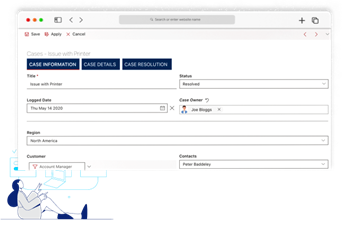
KWIZ Forms is 100% SharePoint native which means:
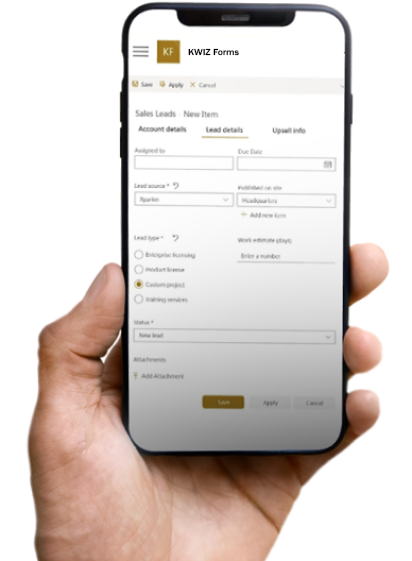
By utilizing Microsoft’s Fluent UI Design System, KWIZ’s modern forms are fully-responsive ensuring your forms support both desktop and hand-held devices. No need for separate form layouts for mobile browser and desktop!
Have the option to use the exact same KWIZ Forms you have in your SharePoint Online lists inside of your MS Teams channel!
*Available for online versions only
Expertise: With years of experience in SharePoint development, we have an in-depth understanding of the platform’s capabilities and how to leverage them effectively.
Continuous Innovation: We stay ahead of the curve by continually enhancing and expanding our product offerings to address evolving business needs and technology trends.
Exceptional Support: Our dedicated support team is readily available to assist with any inquiries or technical issues, ensuring a seamless experience with our products.
Contact us today to explore how SnapOn Software solutions can drive efficiency, innovation, and growth within your organisation. We look forward to helping you maximise your SharePoint investment and achieve your business objectives.




Enhances existing lookup columns with added searching capabilities.
BizzSolve is an IT System and Training Consulting firm. We aim to help companies reach their potential. Ensuring systems, processes and procedures are in place with full traceability to maximise business performance.
As an authorised reseller of SnapOn Software, we proudly offer top-tier solutions to enhance your workflow and efficiency. Our partnership ensures access to the latest innovations in diagnostic and repair technology.